
31 Writing Lists
Learning Objectives
After you complete this chapter, you’ll be able to
- define different types of lists
- create a well-constructed list
Information in this chapter is adapted from Chapter 3.3: Lists in Technical Writing Essentials by Suzan Last (University of Victoria)[1], which is made available by Pressbooks under a CC BY 4.0 license.
Lists, when used correctly, can be a technical writer’s—and reader’s—best friend. Lists allow you to emphasize important ideas. They also increase the readability of text by simplifying long sentences or paragraphs and adding aesthetic passive space to make reading more pleasant. However, using the wrong kind of list or poorly formatting a list can create confusion rather than enhance readability. Therefore, it is important to understand the various types of lists and how and why to use them.
Guidelines for Creating Lists
Follow these guidelines when creating lists of any kind.
Do the following:
- Include between 2-8 items in a list. You must have at least two items in a list (or it’s not a list; it’s just an item).
- Adjust spacing before, after, and within lists to enhance readability.
- Capitalize the first letter of each list item and include a period if the item is a complete sentence.
- Use parallel phrasing for each listed item.
- Phrase the listed items concisely.
- Create a lead-in phrase or sentence to introduce the list.
Avoid doing the following:
- List more than 8 items in a list, as too many items can have the reverse effect. If you emphasize too many ideas, you end up emphasizing nothing. NASA recommends no more than 8 steps in an emergency procedure; more than 8 can be overwhelming in a crisis situation.
- Split a list over two pages if possible.
- Overuse lists. A list should always have explanatory text around it to indicate what this is a list of and why it is needed. A series of lists does not give a reader adequate information and context
- Create a dense block of text; this defeats the purpose of enhancing readability
- Use a heading to introduce a list.
Each kind of list is suited for specific purposes. All lists must conform to a set of rules of construction and formatting. Learning to use the Paragraph formatting tool in Word (see Figure 3.3.1) is crucial to designing effective lists.
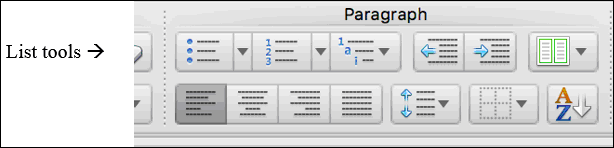
NOTE: If you are making lists by hitting ENTER then TAB and then a dash, you are doing it wrong, and this will make future editing and maintaining readability very difficult if not impossible. Especially when writing documents collaboratively that will need extensive revision and editing, you must make sure to use the correct formatting tools.
Common Types of Lists
Just as bar graphs serve a different purpose than pie charts, different kinds of lists also serve different purposes. This section will describe when and how to use the following five commonly used types of lists:
- Bullet Lists: use when order of listed items is not important
- Numbered Lists: use when order is important, such as steps in instructions
- In-sentence Lists: use when you want to maintain sentence structure and paragraphing, and have a short list (2-4 items)
- Labelled Lists: use when the listed items require some explanation or amplification (like this one)
- Nested Lists: use when listed items have sub-lists (list within a list).
BULLET LISTS
Bullet lists are the most commonly used kind of list. They are effective when
- You want to emphasize two or more items
- You can place the items in any order (no particular order is required)
- You want to add white space to your document to enhance readability.
Bullet list items should generally be short (a word or a phrase). If you find your bulleted items are longer than this, consider using another kind of list, such as a labelled list or a nested list.
NUMBERED LISTS
Use numbered lists when the order of the listed items is important and ideas must be expressed in chronological order. For example, use a numbered list when you must enumerate a series of steps in instructions, or when you are introducing ideas that will be discussed in a certain order in the following text. If you have a list of more than 8 items, consider breaking up the list in two or more stages or categories (Steps in Stage 1, Steps in Stage 2, etc.).
Complete these four steps, in order, to revise your document:
- Check formatting for readability
- Review content to ensure the document contains all necessary information
- Edit sentence style and structure to ensure ideas are clearly and correctly expressed in a formal and precise manner
- Proofread for grammar, spelling, punctuation and usage errors.
NOTE: The 4 steps in the sample numbered list each begin with a verb (check, review, edit, and proofread), indicating what the reader should do, and the numbers indicate the order in which these steps should be performed.
IN-SENTENCE LISTS
Use in-sentence lists when you want to (a) keep paragraph style, (b) to avoid having too many lists on one page, and (c) when the list items are relatively short and can be expressed in a sentence clearly without creating a run-on. The previous sentence is an example of an in-sentence list. Note that a bracketed, lower-case letter introduces each listed item.
Typically, in-sentence lists have 2-4 items. Generally avoid putting more than 4 items in this kind of list (unless they are very short), or your sentence might become difficult to read.
LABELLED LISTS
Use a labelled list when you are listing items that need further explanation. These can be bulleted or numbered. Start the list item with the word or term (the “label” portion), placed in italics and/or bold, and followed by a colon. After the colon, write the explanation or amplification of the term or concept in normal body text.
The course assessment plan includes three main written assignments given in the following order:
- Report One: an internal proposal written in Memo format
- Report Two: an internal proposal written in Short Report format
- Report Three: A comparative recommendation report written for an external client in Long Report format.
The plan also includes two oral presentations:
- Presentation 1: Individual or pair presentation on a technical writing topic (worth 5%)
- Presentation 2: Team presentation giving a progress report on Report 3 (worth 10%).
Make sure the label portions (before the colon) are phrased consistently and either italicized or bolded (or both!) for emphasis; try to make the explanations that follow roughly equal in length and detail.
NESTED LISTS
A “nested” list is a list-within-a-list or a list with sub-listed items. These can be useful for avoiding overly long bullet lists by categorizing items into sub-lists. Note the long bullet list on the left does not effectively categorize items, so emphasis is lost. The Nested List on the right is more effective.
| Sample Bullet List (too long) |
Sample Nested List (well done) |
|
Every restaurant should possess the following beverage containers:
(12 items is too many for one list!) |
Every restaurant should possess the following kinds of beverage containers:
|
Learning Check
Identify the document design errors in the following example:
Five Kinds of List:
- Bullet lists
- numbered lists.
- Lists can be written within a sentence using bracketed letters to introduce the list items.
- nested list
- Also called a “list within a list”
Labelled List
Integrating Lists into Body Text
Just as there are rules for constructing lists, there are rules for how to incorporate them into your text. Most importantly, a list must be introduced by a lead-in sentence (or clause) that contains both a subject and a verb. Writers often use the expression “the following” somewhere in the lead-in sentence to clearly indicate that a list of items will follow.
If the lead-in is a complete sentence that contains both a subject and verb (ie. it could end in a period), it should end in a colon that introduces the listed items. If the sentence is not a complete thought (i.e. you should not put a period there), the lead-in should not end in any punctuation, and each listed item must be able to grammatically complete the lead-in sentence.
Complete lead-in sentence (ends in a colon)
The term design project must allow students to incorporate the following elements into their solution:
- Mechanical engineering principles
- Electrical engineering knowledge
- Software/programming basics.
Lead-in phrase (no punctuation after lead-in)
The term design project must allow students to design a solution using
- Mechanical engineering principles
- Electrical engineering knowledge
- Software/programming basics.
GRAMMAR TIP: One of the most common errors found in technical reports has to do with the introduction of lists and how these are punctuated. Here are some additional examples of how—and how NOT—to introduce lists.
Remember, only use a colon before a list when the introduction to the list is a complete thought, that is, an independent clause: if you can’t put a period there, then you can’t put a colon there. For more information on colons, see the Punctuation chapter in this book, and check out the examples below:
|
Pandas have the following traits:
Common characteristics of pandas include: × (incorrect colon)
|
Pandas are: × (incorrect colon)
Pandas are
|

Learning Check
Test your understanding of colon use with lead-in sentences and phrases:
Evaluate these incorrect lists.
Consider the format, the lead-in, and the listed elements. What revisions might you make?
| 1. |
Revision of your document should be undertaken in 4 stages:
|
| 2. |
The assessment plan for this course includes:
|
| 3. |
The 7 Cs refers to seven characteristics of effective professional writing. This writing should be:
|
Create your own lists:
- Make a list of as many kinds of vehicles as you can think of, being as creative as you can. If you can think of more than 8, consider what kind of list would be most suitable.
- Could you categorize them into nested lists? What kind of categories?
- Consider what text would introduce and follow your list.
- What kind of document would contain a list of vehicle types? Who would read it?
- Read Farkas’ article on “Understanding and using PowerPoint” (.pdf)[1] and create a set of bullet-listed notes summarizing his ideas on “Criteria for Creating Bullet Points.”
- D. K. Farkas, “Understanding and using PowerPoint,” STC Annual Conference Proceedings, May 2005, pp. 313-320. ↵
- Last, S. (2019, January 1). Technical writing essentials: Introduction to professional communications in the technical fields. University of Victoria. https://pressbooks.bccampus.ca/technicalwriting/ ↵