Resume and Cover Letter Writing
9 Applicant Tracking Systems (ATS)

Applicant Tracking Systems (ATS) are used when a company asks you to apply through their online application portal (for example, Shopify).
An ATS scans your resume for keywords and skills that match the job posting. This is why it’s important to include the same keywords you see in the job description on your resume.
To make sure your resume passes through an ATS, keep the format simple and easy for the system to read.
Tips to help your resume pass an ATS:
-
Don’t use headers, footers, or page numbers
-
Don’t use columns, tables, graphs, or images
-
Spell out any acronyms (e.g., “Bachelor of Arts” instead of “B.A.”)
-
Use bullet points instead of long paragraphs
-
Use keywords from the job posting
-
Submit your resume as a Word document (unless they ask for another format)
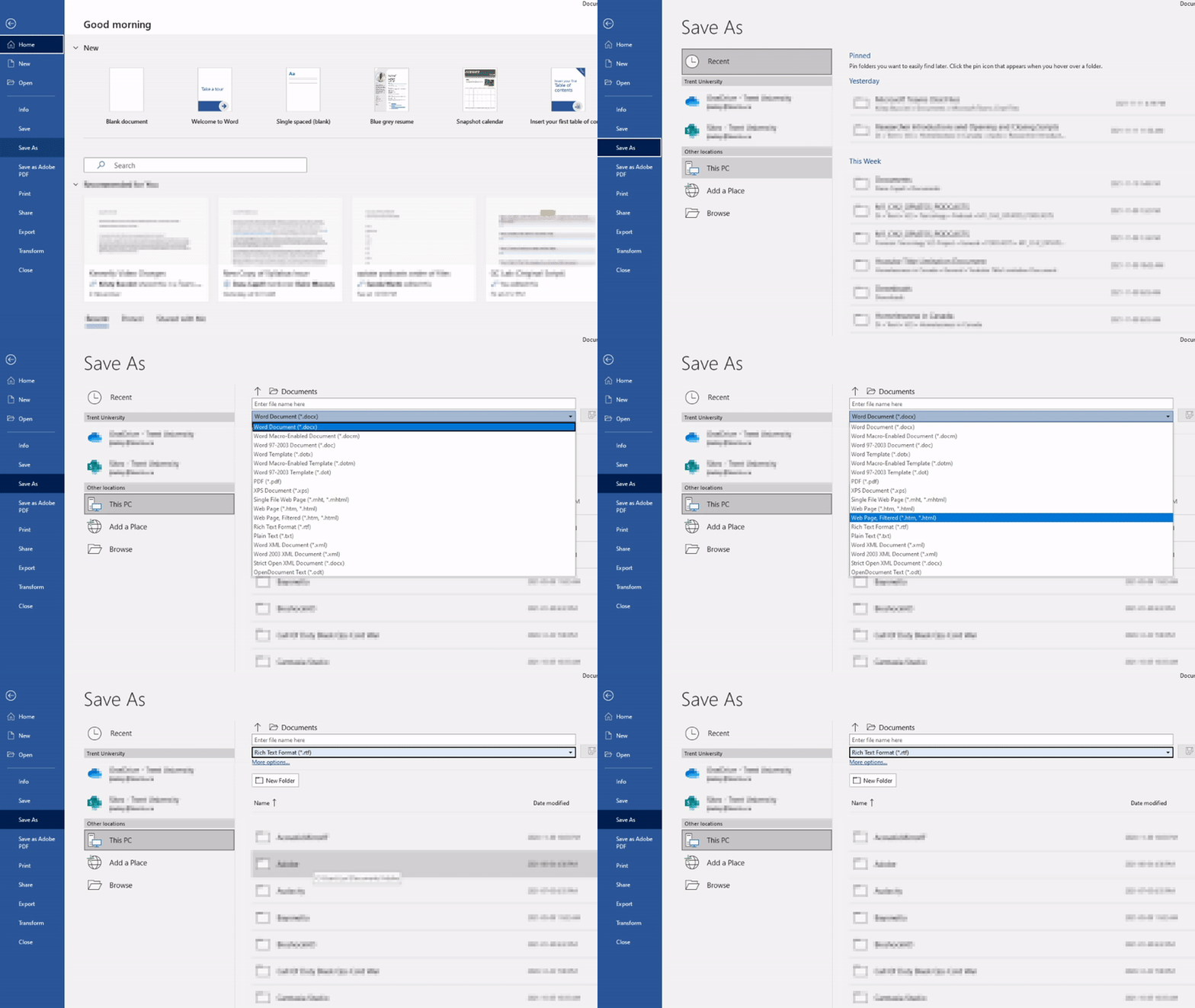
 You can also save your document in .rtf format to see how it looks in plain text. Go through the document in .rtf format, then check and remove any incorrect symbols that appear in the document. You can then save the corrected document in.docx format. How you save the file will be different depending on your word processor, but we’ve included an example for Microsoft Word that you can follow along with.